

Monitor Arms: Reclaim Your Desk, Spare Your Neck
Spend four hundred pounds on a chair and you have improved one part of your working day. Spend ninety on a monitor arm and you have moved the screen to where your eyes already point. It is the cheapest ergonomic upgrade in the building, and I say that as someone who stares at a display for a living.
The chair gets all the attention because it is the thing you sit in. The screen gets none, because it turned up in a box with a stand already attached and nobody thought to question it. That stand was built to ship flat and sit still. It was not built around your neck.
Why a monitor arm beats the stand in the box
The rough rule is that the top of the screen wants to sit at or just below eye level, about an arm's length away. Most factory stands land the display ten to fifteen centimetres lower than that. You make up the difference by tilting your chin down, and then you hold that tilt for seven hours. Lumbar support cannot do much about a problem happening at the other end of your spine.
An arm moves, so you stop guessing. The quick release gas spring monitor arms travel between 16.2cm and 40.6cm above the desk, which covers a five foot two colleague and a six foot four one on the same desk without anyone fetching a ream of paper to prop things up. On a hot desk that matters more than the specification sheet makes it sound.
A stand puts your screen where the factory decided. An arm puts it where your eyes already are.
Single or dual, and being honest about which you need
A single arm is £91 and a dual is £146, both excluding VAT. Before you reach for the dual, think about how you actually work. If the second screen holds email and a chat window in the corner of your vision, it does not need to be a matched twin sitting dead centre. Set it slightly further back, angled in, and let the main screen keep the good seat.
Two large displays squared up side by side look tremendous and quietly reintroduce the problem you were solving, because now you turn your head all day instead of tilting it. A shallow V, with the join roughly in front of your nose, is kinder.
Desk clamp or grommet mount
Both come in the box with the quick release arms, so this is a question about your desk rather than an upsell.
1. The clamp
The clamp grips the back edge of the desk. Quickest to fit, and easy to move when someone changes seats. It needs a clear run of edge with nothing behind it, so if your desk sits hard against a wall or has a modesty panel running right up to the top, check you can still get a hand in there.
2. The grommet mount
The grommet mount drops through an existing cable port and bolts underneath. It sits flush and leaves the back edge clear, which is the tidier answer if your desk already has a port where you want the screen. It is also the one to choose if the desk edge is thicker than the clamp likes.
Five things worth checking before you buy
VESA 75 or 100 mounting holes on the back of the screen. Most office monitors have them. A few slim consumer models hide them behind a cover.
Screen weight. The quick release arms carry 1.5kg to 7kg per arm, the ported version 2kg to 6.5kg.
Screen size. 15 to 27 inches on the quick release, 13 to 27 on the ported one.
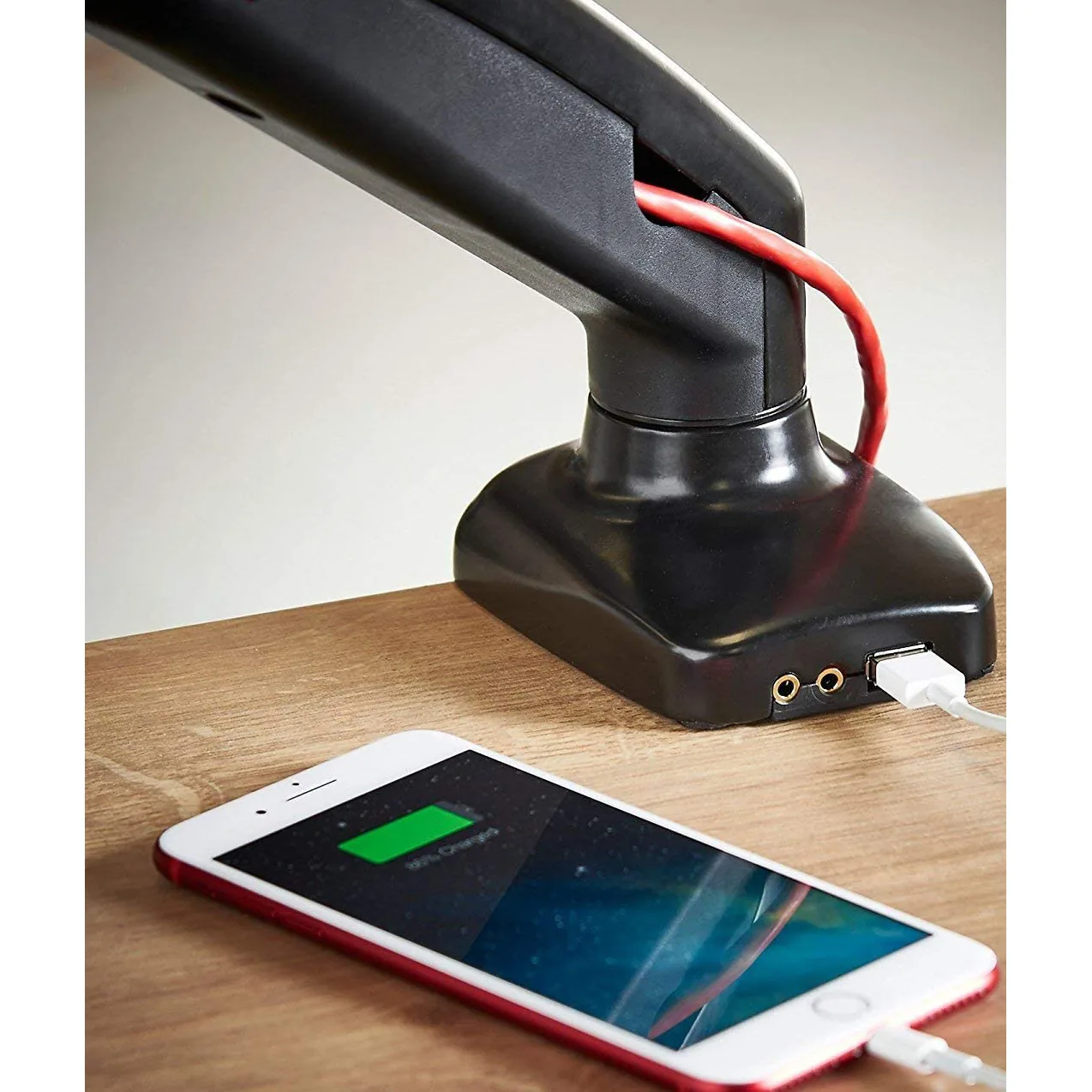
Whether you want ports at desk level. The adjustable VESA arms with USB and audio ports build a USB, audio and mic socket into the base, which saves fishing round the back of the monitor for a headset.
Cable length. Raising a screen by 20cm eats more slack than you expect.
The part nobody mentions: you get your desk back
Take the stand away and a surprising amount of surface comes back with it. On a 120cm office desk that is the difference between a laptop having a home and a laptop living on a pile of paper. Push the screen back over the edge when you need room to write, pull it forward for detail work, and the desk stops being full.
It is worth the same thought on a dual motor standing desk. If the desk moves and the screen stays put on its factory stand, you have only got the height right in one of the two positions. An arm keeps the distance between your eyes and the screen the same whether you are sitting or standing, which is rather the point of raising the desk in the first place.
Every arm in our monitor arms and stands range lists its weight range, VESA fitting and height travel on the page, because guessing at those is how you end up owning a monitor arm and a monitor that have never met.
Contents

Web Developer
Keeps the site quick, honest and free of the usual dark patterns.